
Build
Origin allowlist
Only the websites you list may call your service from a browser. A request from any other Origin is refused, so other sites cannot use your users' sessions.
A browser tells your service which site a request comes from, in the Origin header. With the allowlist on, a request from a site that is not on the list is refused with 403. That stops another website from making your users' browsers call your API with their sessions.
Requests without an Origin header, from a server, a script or a mobile app, are not affected.
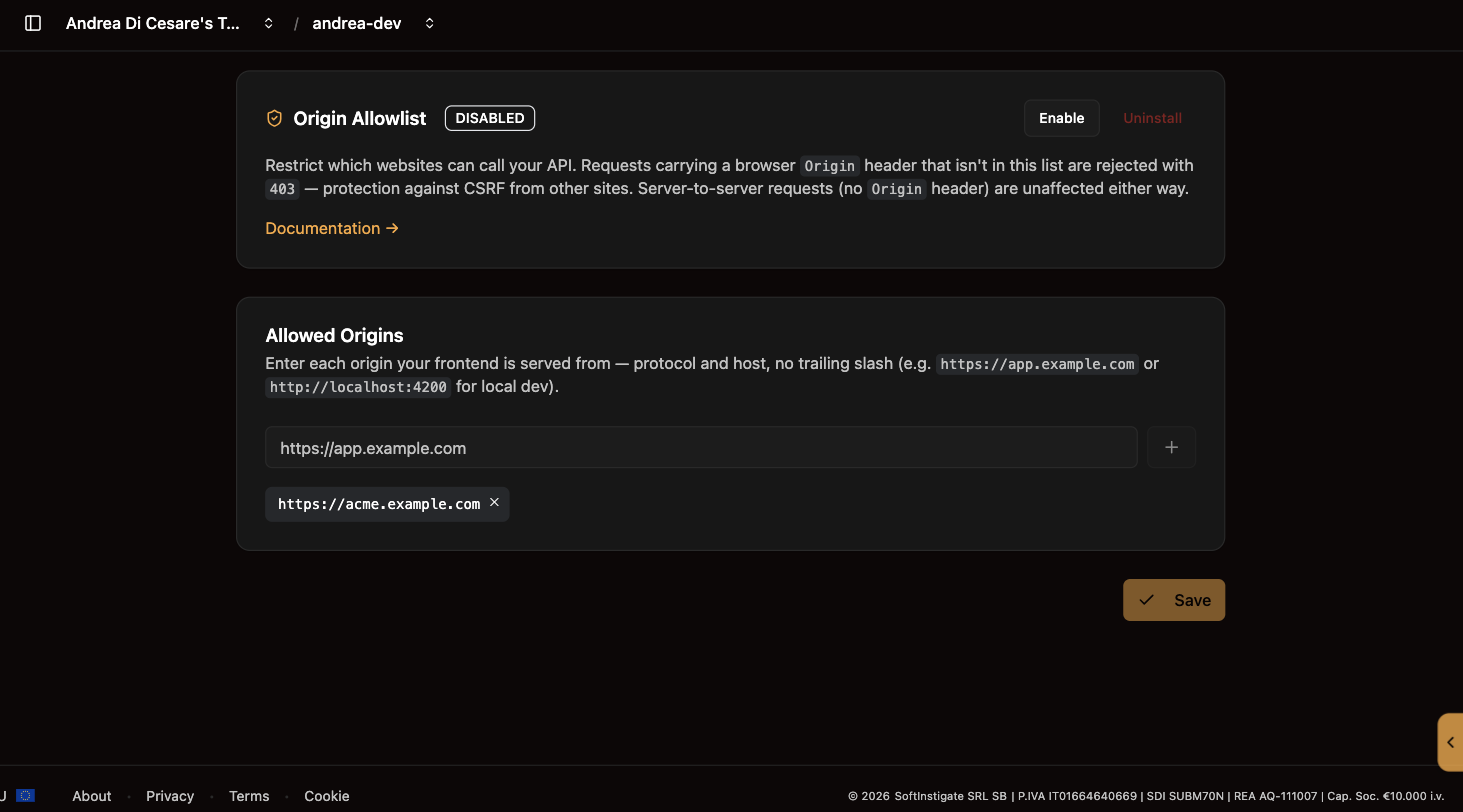
Set it up
-
Open Origin Allowlist and click Enable.
-
Type each origin your app is served from and press Enter:
https://app.example.com,https://admin.example.com, andhttp://localhost:4200while you develop. An origin is protocol, host and port; no path, no trailing slash. -
Save. It takes up to a minute to reach every node.
With the plugin on and the list empty, every browser request is refused. Add the origins first.
Disable turns the check off and keeps the list. Uninstall removes both.
Before going live
Remove the localhost entries, and test once from each listed origin and once from one that is not.
Related pages
-
Permissions: who may do what, once the request is accepted.
-
Guards: rules about the user’s state, rather than about the site.