
Your users
Permissions
Who may do what in your service, by role: rules with a path, a method and a priority, plus filters that limit a user to their own documents.
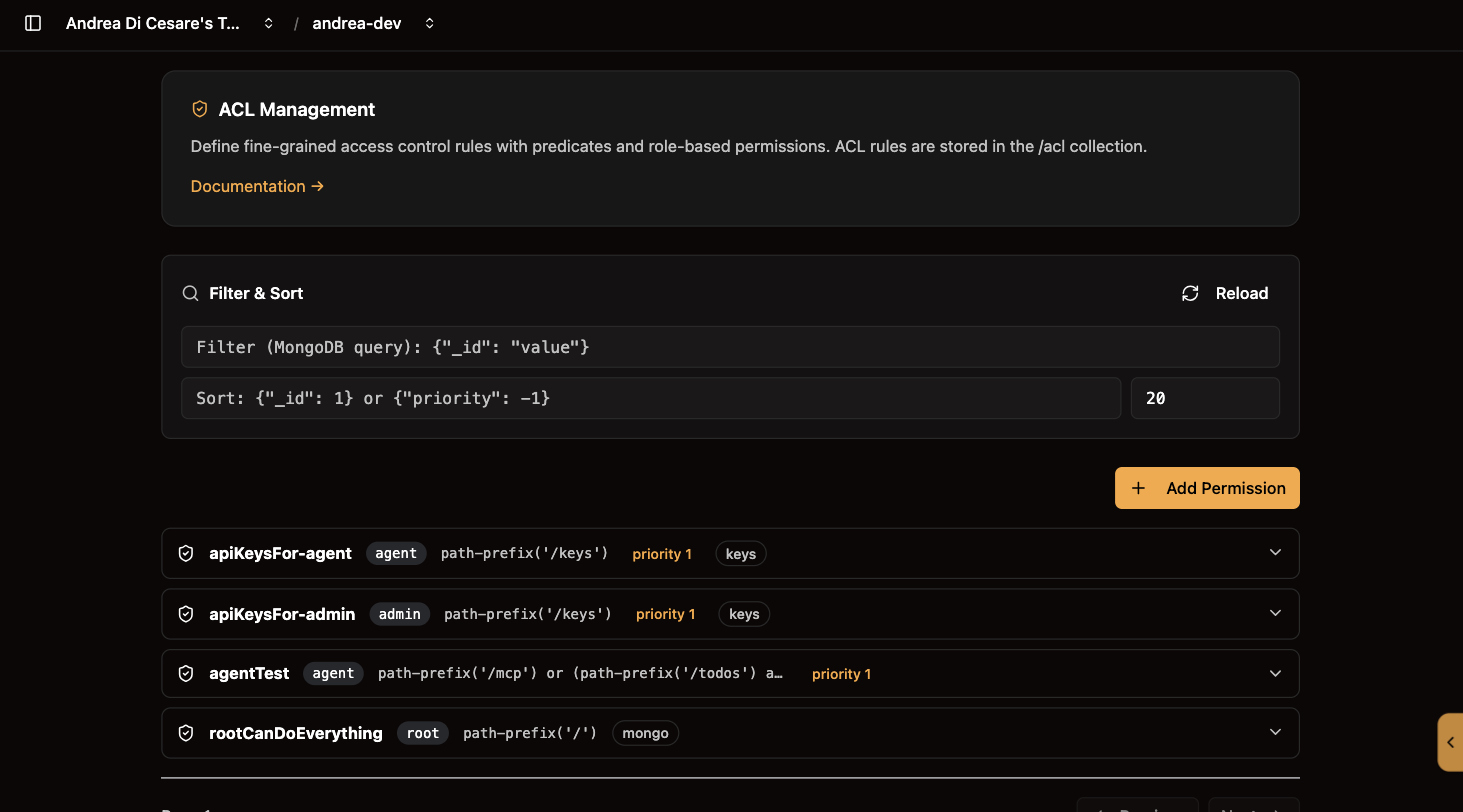
A permission says what a role may do: which paths, which methods, and optionally which documents. Every request to your service is checked against them on the server, so the client cannot talk its way past. Permissions are documents in the acl collection, managed under Permissions.
How a request is checked
RESTHeart’s mongoAclAuthorizer evaluates every incoming HTTP request against the ACL documents stored in the acl collection. The authorizer:
-
Finds all ACL documents whose
rolesarray intersects with the authenticated user’s roles. -
Among those, finds documents whose
predicatematches the request (path, method, query string, etc.). -
Evaluates them in ascending
priorityorder — lower numbers are evaluated first. -
If any matching rule permits the request, it is allowed; otherwise it is denied.
The path on Dedicated
| Plan | ACL collection path |
|---|---|
Free / Shared |
|
Dedicated |
|
The UI abstracts this difference — you always navigate to Service → Permissions regardless of plan.
A permission document
{
  "_id": "usersCanReadOrders",
  "roles": ["user"],
  "predicate": "path-prefix('/orders') and method('GET')",
  "priority": 100,
  "mongo": {
    "readFilter": { "owner": "@user._id" },
    "writeFilter": null,
    "mergeRequest": null,
    "projectResponse": null
  }
}| Field | Required | Description |
|---|---|---|
|
Yes |
Unique identifier for this permission rule. Choose a descriptive name (e.g. |
|
Yes |
Array of role name strings. The rule applies to any authenticated user who holds at least one of these roles. Roles are defined on user documents in the Users section. |
|
Yes |
An Undertow predicate expression that must evaluate to |
|
Yes |
Integer evaluation order. Lower values are evaluated first. Use lower numbers for more specific (higher-priority) rules. |
|
No |
Optional object with MongoDB-level security modifiers. See MongoDB Options below. |
|
No |
Only on a permission for |
The list
The ACL list is fetched via GET /acl?page=…&pagesize=… and displayed in a paginated, searchable table. Each row shows the _id, the roles, the predicate, the priority, and action buttons.
Search and filter
Use the Search box to apply a MongoDB filter expression, for example:
{ "roles": "user" }or
{ "priority": { "$lt": 50 } }A Sort expression (JSON object) can also be applied, mapping to the sort query parameter.
Add a permission
-
Click New Permission.
-
Fill in the form fields:
-
ID (
_id) — unique name for the rule. -
Roles — one or more role names this rule applies to.
-
Predicate — the Undertow predicate expression (see below).
-
Priority — integer; lower evaluates first.
-
MongoDB Options — optionally configure
readFilter,writeFilter,mergeRequest, andprojectResponse.
-
-
Click Save. The UI submits
POST /aclwith the document body.
Edit a permission
-
Click Edit on a permission row to expand the inline accordion form.
-
All fields except
_idare editable. -
Click Save. The UI issues
PATCH /acl/<id>with the updated fields.
Delete a permission
Click Delete on a permission row. A confirmation dialog appears before the DELETE /acl/<id> request is issued.
|
Warning
|
Deleting a permission rule takes effect immediately. Any users whose access relied solely on that rule will be denied on the next request. |
The predicate language
The predicate field uses the Undertow predicate expression language. A predicate is a boolean expression that is evaluated against the incoming HTTP request. The following predicates are available:
Paths
| Predicate | Description | Example |
|---|---|---|
|
Matches the exact request path. |
|
|
Matches any path that starts with the given prefix. |
|
|
Matches parameterised paths; a captured segment is referenced later in the predicate as |
|
|
Matches paths ending with the given suffix. |
|
|
Matches the path against a regular expression. |
|
Methods
| Predicate | Example |
|---|---|
|
|
|
|
|
Combining them
Use and, or, and not to compose complex rules:
path-prefix('/orders') and method('GET')path-prefix('/reports') and (method('GET') or method('POST'))path-prefix('/admin') and not method('GET')Common predicates
| Goal | Predicate |
|---|---|
Allow GET on any path |
|
Allow all methods on |
|
Allow POST only to |
|
Allow GET and PATCH on |
|
Allow everything under |
|
Deny DELETE everywhere (use |
|
Allow a user to edit only their own document |
|
… and only one field of it |
|
The @user.sub branch above covers users authenticating with a JWT, where the account id is carried in the sub claim rather than in _id. bson-request-whitelist takes one or more comma-separated keys, dotted for nested ones (bson-request-whitelist(profile.name, profile.surname)), and matches the request body as the client sent it — before any mergeRequest enriches it.
|
Tip
|
Use the Predicate helper tooltip inside the permission form — it shows common predicate patterns inline without leaving the page. |
Limit what a user sees and writes
The optional mongo object adds MongoDB-level security on top of the predicate match. These modifiers are applied transparently to every request that matches the rule.
readFilter
A MongoDB filter document appended to every read (GET) query. Clients can only see documents that match the filter, regardless of any filter parameter they provide.
Use case — row-level security:
{
  "mongo": {
    "readFilter": { "owner": "@user._id" }
  }
}
The placeholder @user._id is replaced at runtime with the authenticated user’s _id. This ensures each user sees only documents they own.
writeFilter
A MongoDB filter document applied to every write operation (PUT, PATCH, DELETE). Write operations are silently restricted to documents matching the filter.
Use case — prevent writing to other users' documents:
{
  "mongo": {
    "writeFilter": { "owner": "@user._id" }
  }
}
mergeRequest
A document merged into every write request body before it is persisted. Use this to automatically inject server-enforced fields that clients should not be able to forge.
Use case — auto-stamp ownership on document creation:
{
  "mongo": {
    "mergeRequest": { "owner": "@user._id" }
  }
}
Write sub-documents as nested objects rather than with dotted keys. A merged request that touches both a field and a path inside it is rejected by MongoDB with ConflictingUpdateOperators.
Update operators in mergeRequest
Plain fields are merged into $set. A MongoDB update operator can be merged as well — written with a leading underscore, since the key would otherwise be an illegal one in a stored document. _$push becomes $push when the request is merged.
Use case — append to a server-controlled history, without letting the client overwrite it:
{
  "mongo": {
    "mergeRequest": {
      "lastSeenAt": "@now",
      "_$push": { "auditTrail": { "at": "@now", "by": "@user._id" } }
    }
  }
}
The client sends the field only to satisfy whatever bson-request-whitelist the predicate carries; the value it sends for a key that an array operator manages is discarded, so the two cannot conflict.
projectResponse
A MongoDB projection applied to every response document before it is sent to the client. Use this to mask sensitive fields.
Use case — hide sensitive fields:
{
  "mongo": {
    "projectResponse": { "passwordHash": 0, "internalNotes": 0 }
  }
}
Variables you can use
| Variable | Value at runtime |
|---|---|
|
The |
|
The |
|
The current instant, as a BSON date. Declare it in a JSON Schema as |
API keys
A request that authenticates with an API key goes through the same ACL as a password sign-in, with one difference: it carries the key’s roles, not the roles of the user who issued it. A key’s roles are usually narrower than its owner’s, and each one is an ordinary role that you grant permissions to like any other. readFilter, projectResponse and the rest apply as usual.
Which roles a key may be given is decided here too. A permission that lets a role reach /keys carries an apiKeys block:
{
  "_id": "usersIssueKeys",
  "roles": ["user"],
  "predicate": "path-prefix('/keys')",
  "priority": 100,
  "apiKeys": {
    "roles": ["cli-ro"],
    "max-expires-in-days": 90,
    "max-keys-per-user": 5
  }
}| Field | Meaning |
|---|---|
|
The roles a key issued under this permission may carry. Required: a non-empty array of distinct role names. |
|
The longest life such a key may have. Optional; the service default applies otherwise, and a user may always ask for less. |
|
How many keys one user may hold at a time. Optional; the service default applies otherwise. |
Three things to know:
-
A permission on
/keyswithout the block issues nothing. Its roles reach the endpoint and get a403that says so. -
A malformed block is refused when the permission is written, with a
400that names the field, whether it comes from the console,rhcorcurl. -
The key’s roles need not be roles the user holds. With the example above a
usermay issue acli-rokey, and what that key can do is whatever other permissions grant tocli-ro.
The API Keys page lists the permissions on /keys with the roles each one grants and adds new ones from three fields. They are the same documents you see on the Permissions page.
Priority
Rules with lower priority numbers are evaluated first. This is the opposite of what "priority" means in everyday language — think of it as evaluation order rather than importance.
| Priority value | Typical use |
|---|---|
|
Root / super-admin rules that must always win (e.g. |
|
Highly specific rules (exact paths, narrow method sets). |
|
Standard application rules. |
|
Catch-all or fallback rules. |
|
Tip
|
When two rules both match a request, the first one evaluated (lowest priority number) takes precedence. Structure your rules so the most specific rules have the lowest numbers. |
A worked example: orders
The following three ACL documents implement a typical order-management permission model:
/orders{
"_id": "adminsFullOrders",
"roles": ["admin"],
"predicate": "path-prefix('/orders')",
"priority": 10
}{
"_id": "usersCreateOrders",
"roles": ["user"],
"predicate": "path('/orders') and method('POST')",
"priority": 100,
"mongo": {
"mergeRequest": { "owner": "@user._id" }
}
}{
"_id": "usersReadOwnOrders",
"roles": ["user"],
"predicate": "path-prefix('/orders') and method('GET')",
"priority": 100,
"mongo": {
"readFilter": { "owner": "@user._id" }
}
}From a script
| Operation | Endpoint |
|---|---|
List permissions |
|
Create permission |
|
Update permission |
|
Delete permission |
|
On Dedicated plans replace /acl with /restheart/acl in all paths above.
Related pages
-
Managing Users — create the users and roles referenced in ACL rules.
-
Guards — rules evaluated after authorization, for conditions that depend on the user’s state rather than their role.
-
Root User Setup — the initial
rootCanDoEverythingpermission is created here. -
Users and Permissions (API reference) — API-level permission examples.
-
API Keys — the
apiKeysblock, and what a request made with a key may do. -
Dedicated vs. Free/Shared Plans — understand collection path differences between plans.
-
Permission Management (full reference) — deep-dive into the
mongoAclAuthorizer, predicate language, and advanced patterns.