
Modern applications need to connect with the world. When an order is placed, you need to notify your fulfillment system. When a user signs up, you want to trigger a welcome email campaign. When inventory runs low, your purchasing team needs an alert in Slack. These integrations are critical to building great products.
The RESTHeart Cloud Webhook plugin turns your backend into an event-driven integration hub, automatically notifying external systems when API requests match your specified conditions.
The Integration Challenge
Building reliable webhook systems from scratch is harder than it looks. You need to intercept API requests in real-time, decide which requests should trigger webhooks, transform request data into the format external systems expect, handle HTTP requests to external endpoints reliably, retry failed requests with exponential backoff, log everything for debugging and compliance, and secure sensitive data in transit.
Each of these requirements is non-trivial. Building a production-ready webhook system can take weeks. Maintaining it requires ongoing attention to edge cases, timeouts, and external system failures.
Or you could activate the Webhook plugin and start sending webhooks today.
How It Works
The Webhook plugin intercepts requests to your RESTHeart Cloud backend. When a request matches your specified conditions, it automatically triggers HTTP requests to your configured endpoints.
The Flow
- Request arrives at your backend (MongoDB APIs, GraphQL, WebSocket, or any other service)
- Condition evaluates using RESTHeart's powerful predicate system
- Body transforms (optional) using Mustache templates to extract request data
- Webhook fires to your external endpoint
- Logs record everything for debugging and compliance
All of this happens automatically, reliably, and at scale.
Key Features
Flexible Triggers with Predicates
Define exactly when webhooks fire using RESTHeart's predicate language. Match specific HTTP methods, filter by request paths, check field values, combine conditions with boolean logic, and use regex patterns for complex matching.
Examples:
# Trigger on POST requests to /orders
method(POST) and path-prefix('/orders')

# Trigger on all POST and PATCH requests to orders
path-prefix('/orders') and (method(POST) or method(PATCH))

# Complex conditions with method and path
method(POST) and path-prefix('/users') and not(path('/users/me'))
Predicates give you precise control over when webhooks fire, ensuring you only send notifications when truly relevant.
Body Transformation with Mustache
External systems often require data in specific formats. The Webhook plugin includes a powerful transformation engine using Mustache templates to reshape your request data to match any external API requirements.
Transform webhook bodies to match any API:
Input (Request data):
{
  "request": {
    "method": "POST",
    "path": "/orders",
    "body": {
      "_id": "order_123",
      "customer": {
        "name": "Alice Johnson",
        "email": "alice@example.com"
      },
      "items": [
        {"product": "Widget", "quantity": 2, "price": 29.99}
      ],
      "total": 59.98,
      "status": "pending"
    }
  }
}
Transformation Template:
{
  "order_id": "{{request.body._id}}",
  "customer_email": "{{request.body.customer.email}}",
  "customer_name": "{{request.body.customer.name}}",
  "order_total": "{{request.body.total}}",
  "order_status": "{{request.body.status}}",
  "item_count": "{{request.body.items.length}}"
}
Output (sent to webhook):
{
  "order_id": "order_123",
  "customer_email": "alice@example.com",
  "customer_name": "Alice Johnson",
  "order_total": "59.98",
  "order_status": "pending",
  "item_count": "1"
}
Access nested properties with dot notation, restructure data to match external APIs, select only the fields you need, and format data for any webhook receiver. No custom code required.
Intelligent Retry Logic
Network failures happen. External services go down. Timeouts occur. The Webhook plugin handles all of this automatically.
When webhook requests fail, the system retries with exponential backoff, gives up gracefully after maximum attempts, logs all retry attempts for visibility, and preserves your data integrity throughout.
You define the timeout threshold (default 5000ms). The plugin handles everything else.
Comprehensive Logging
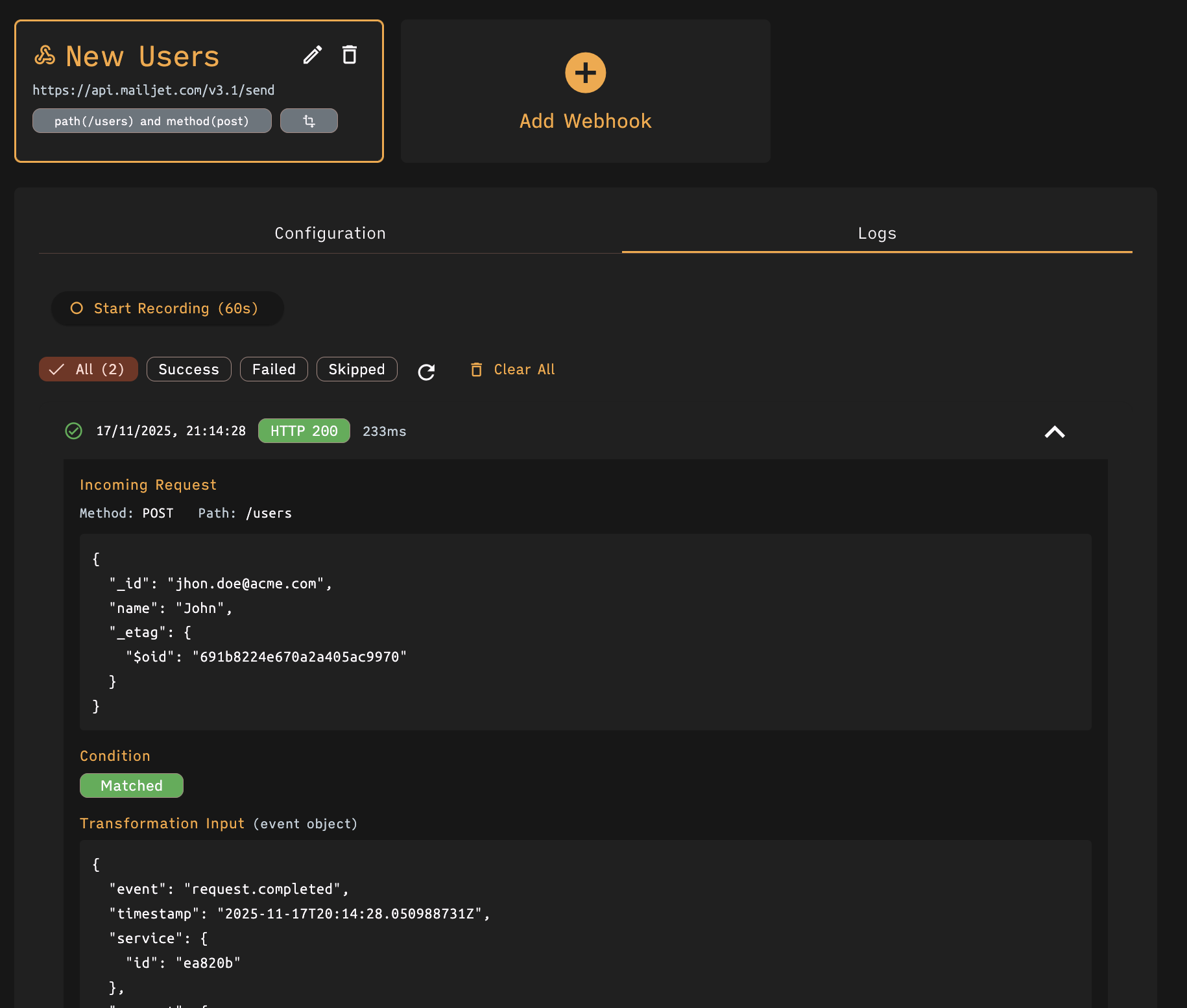
Every webhook execution creates a detailed log entry. You can see incoming request details, condition evaluation results, transformation input and output, webhook request and response, HTTP status codes and timing, error messages for failed requests, and complete audit trail.
Real-Time Testing with Recording
Building webhooks requires iteration. The plugin includes a recording mode that captures live events for testing.
Start recording from the management interface, send requests to your API to generate events, select recorded events to test transformations, see real-time preview of transformed data, and verify webhook behavior before going live.
No more guessing whether your transformation template works. Test with real data and see exactly what gets sent.
Custom Headers Support
Many webhook receivers require authentication or custom headers. The plugin lets you configure any HTTP headers for your webhook requests.
Common use cases:
Authorization: Bearer sk_live_abc123
X-API-Key: your-api-key-here
Content-Type: application/json
X-Webhook-Source: restheart-cloud
Headers support sensitive values securely stored and managed through the RESTHeart Cloud interface.
Management Interface
The Webhook plugin includes a comprehensive management interface with everything you need to configure, test, and monitor webhooks.
Webhook Configuration
Create and edit webhooks with intuitive forms. Define webhook name and target URL, specify trigger conditions with predicate builder, configure timeout thresholds, add custom headers including authentication, enable body transformation with Mustache templates, and preview transformation results with real events.
Real-Time Preview
Test transformations before deployment by selecting recorded events from live traffic, viewing side-by-side input and output, validating template syntax with instant feedback, and catching errors before webhooks go live.
The preview shows both the original event data and the transformed output, making it easy to verify your Mustache templates produce the expected results.
Log Analysis
Monitor webhook performance with detailed logs showing execution status (success, failed, skipped), HTTP response codes and timing, complete request and response bodies, transformation input and output, error messages and stack traces, and filtering by status and pagination support.
Logs help you debug issues quickly, prove compliance with audit requirements, understand system behavior, and optimize webhook performance.
Recording Mode
Capture live events for testing by clicking "Start Recording" to capture 60 seconds of events, generating test traffic to your API, selecting captured events for transformation testing, and viewing complete event data including request details.
Recording mode is invaluable during development and when modifying existing webhooks. Test with real production-like data without affecting live systems.
Real-World Use Cases
E-Commerce Order Fulfillment
Scenario: When customers place orders, your fulfillment center needs immediate notification.
Solution:
Condition: method(POST) and path('/orders')
URL: https://fulfillment.example.com/api/incoming-orders
Transformation: Map MongoDB order format to fulfillment system format
Headers: Authorization: Bearer [fulfillment-api-key]
Order requests flow automatically from your storefront to fulfillment. No manual processes, no polling, no delays.
Slack Notifications for Critical Events
Scenario: Your team needs instant Slack alerts when deals are updated.
Solution:
Condition: method(PATCH) and path-prefix('/deals')
URL: https://hooks.slack.com/services/YOUR/WEBHOOK/URL
Transformation: Format message for Slack with customer name, deal value, and sales rep
Your sales team sees notifications in real-time. Use transformation to filter high-value deals in the webhook body.
CRM Synchronization
Scenario: Keep your CRM in sync with customer data changes.
Solution:
Condition: path-prefix('/customers') and (method(POST) or method(PATCH))
URL: https://api.crm-system.com/v1/contacts/sync
Transformation: Map request data to CRM contact format
Headers: X-API-Key: [crm-api-key]
Customer data stays synchronized automatically. No manual export/import cycles.
Analytics Pipeline
Scenario: Feed user activity events into your analytics platform.
Solution:
Condition: path-prefix('/events')
URL: https://analytics.example.com/api/ingest
Transformation: Extract relevant fields and add metadata
Headers: Authorization: Bearer [analytics-token]
User behavior flows to your analytics system in real-time. Make data-driven decisions faster.
Multi-System Integration
Scenario: One event needs to trigger multiple systems - inventory, shipping, accounting, and notifications.
Solution: Create multiple webhooks with the same condition, each targeting different systems with appropriate transformations.
Webhook 1: Inventory system
Webhook 2: Shipping provider
Webhook 3: Accounting software
Webhook 4: Customer notification service
One order placement triggers your entire backend workflow automatically.
Configuration Example
Here's a complete webhook configuration for order fulfillment:
Basic Settings:
- Name: "Order Fulfillment Webhook"
- URL:
https://fulfillment.acme.com/api/orders - Timeout: 5000ms
- Condition:
method(POST) and path('/orders')
Headers:
Authorization: Bearer sk_live_abc123xyz
Content-Type: application/json
X-Webhook-Source: restheart-cloud
Transformation Template:
{
  "external_order_id": "{{request.body._id}}",
  "customer": {
    "email": "{{request.body.customer.email}}",
    "name": "{{request.body.customer.name}}",
    "shipping_address": {
      "street": "{{request.body.shipping.street}}",
      "city": "{{request.body.shipping.city}}",
      "zip": "{{request.body.shipping.zip}}",
      "country": "{{request.body.shipping.country}}"
    }
  },
  "items": "{{request.body.items}}",
  "total_amount": "{{request.body.total}}",
  "currency": "{{request.body.currency}}",
  "created_at": "{{request.body.created_at}}"
}
This configuration watches for POST requests to the orders endpoint, transforms the request data to the fulfillment system's format, includes authentication, and logs everything.
Get Started Today
Ready to connect your API to the world?
Contact us to activate the Webhook plugin for your service. We'll have you sending webhooks within hours. No infrastructure to build, no maintenance required, just powerful integrations ready to use.
Contact us: cloud@restheart.com
Or visit the plugins page to learn more about all available plugins.
RESTHeart Cloud Webhook Plugin: Transform your backend into an event-driven integration hub.
Ready to Build Something Great?
Focus on what makes your app unique. Your backend is ready in minutes. Start with our free tier - no credit card required.